Auto Undercut Retainer
Toshi's Box
A plugin to automatically undercut the items you're selling.
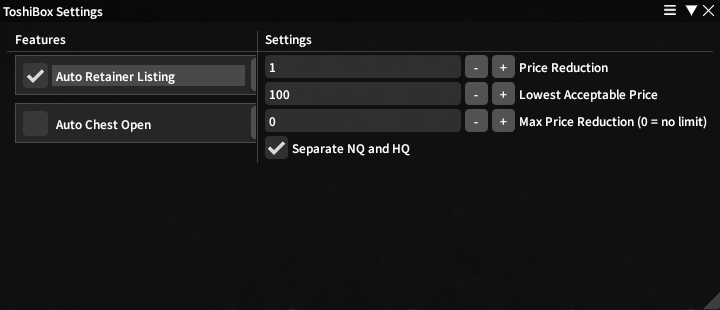
📦 Installation (Dalamud Third-Party Plugin)
To install this plugin in XIVLauncher / Dalamud:
- Open XIVLauncher → Settings →
Experimentaltab - Click "Enable custom plugin repositories"
- Go to Dalamud Plugins →
Settingstab - Under "Custom Plugin Repositories", add:
https://tykku.github.io/ToshiBox/pluginmaster.json - Click Save, then search for ToshiBox in the Plugin Installer and install it.
- Type in chat:
/toshibox toggleshangriladida009 - Type
/toshiactivate Auto Retainer Listing and set your price reduction, lowest price and max price reduction - Then go to your retainer and open the items sell panel and it will undercut every for you